

Redmi Watch 4




Key features
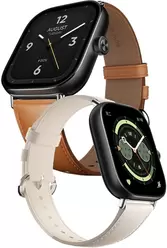


-
 1.97" LTPS AMOLED
390 x 450 px
Aspect ratio: 10.4:9 -
 47.58 x 41.12 x 10.50 mm
31.50 g
-


-
 Li-Po 470 mAh
-

-

-

-
 4Q 2023
(2 years 10 months ago) -
 44.76 C2T
Battery capacity to thickness ratio
-
 63.30%
Screen-to-body ratio

| Brand |
Redmi RedmiPhones |
|---|---|
| Model name | Watch 4 |
| Other names | M2314W1, Xiaomi Redmi Watch 4 |
| Announced |
4Q 2023 (2 years 10 months ago) |
| Type | Smartwatch |
| Other resistances | 5ATM |
| Dimensions | 47.58 x 41.12 x 10.50 mm |
| Weight |
31.50 g
Buy case |
| Colour |
Available in 2 variants:
|
| Display |
Color / LTPS AMOLED, 60 Hz 390 x 450 px (1.97") 302 ppi max. luminance 600 nitów [cd/m²] ∼63.3% screen-to-body ratio |
| Display protection |
 Buy screen protector |
| Standard battery |
Li-Po 470 mAh
Buy powerbank |
| Quick battery charging |
|
| Charger included in the package |
|
| Wireless battery charging |
|
| Operating system | HyperOS |
| Touchscreen |

|
| DualSIM |
|
| EAN |
Available in 2 variants:
|
| MPN |
Available in 2 variants:
|

ADDITIONAL INFORMATION
-
Optical heart rate and blood oxygen sensor. Strap: 135-205 mm. Works with Android 8.0 and later or iOS 12.0 and later. Over 150 sports modes.

SENSORS
-
Accelerometer
-
Proximity
-
Light
-
Magnetometer
-
Gyroscope
-
Barometer
-
Altimeter
-
Gravity
-
Hall-effect
-
Iris scanner
-
Fingerprint scanner
-
Thermometer
-
Hygrometer
-
Heart rate monitor
-
Pulse oximeter
-
Blood pressure sensor

DATA TRANSFER
-
HSDPA
-
HSUPA
-
HSPA
-
HSPA+
-
Bluetooth
v5.3
Buy headphones
-
A2DP Profile
-
WiFi
read more
-
DLNA
-
Infrared
-
GPS module
-
A-GPS
-
GLONASS support
-
Beidou
-
Galileo
-
QZSS support

COMMUNICATION AND MESSAGING
-
Call waiting
-
Conferency
-
Call forwarding
-
Push To Talk
-
SMS
-
MMS

MULTIMEDIA
-
MP3
-
Games

PIM AND ADDITIONAL FUNCTIONS
-
Watch
-
Stopwatch
-
Alarm
-
Calculator
-
Organizer
-
Calendar
-
Themes
-
Recorder
-
Vibrations

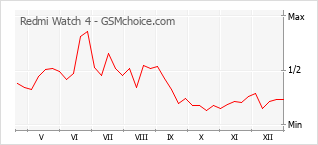
POPULARITY CHART


Your rating
8,50

General
Design
Features
Ratings:
1 |
Visits:
25447 |
Popularity:
0,01%
Opinions (13)
Questions (0)
Ratings:
1 |
Visits:
25447 |
Popularity:
0,01%
 To your site

 Compare data


A D V E R T I S E M E N T
We do our best to present the proper and current information on this page. However, in case of finding any error in the data above please


Hop
Great smartwatch with outstanding parameters. Large, clear AMOLED display with 600 nits. Battery performance is outstanding! I managed to use it easily for two weeks with normal usage. Generally, I recommend it - Amazfit cannot compete.
XRW4
Charging 5V/1A. I charged it with a 5V/2A charger, so the charging probably adapts to the charger used. The box includes a 50cm cable with very easy-to-use charging. Simply bring it close and the magnet catches the plug. I have seen many questions about the packaging. The original box is sealed on two sides with round 1 cm foil stickers, which are easy to peel off. The color of my unit, according to the box: Silver Gray. Model: M2315W1. Software version: 2.1.53 - I updated it after the first startup. The crown also has a button function. After pressing the crown towards the case, two options appear: the main clock or the list of all applications. The compass has relatively accurate readings. I compared it with a better one and there is a difference of 2-3 degrees. During the SpO2 measurement, the watch should be positioned 15-2 cm from the wrist fold. The measurement lasts 30 s. The heart rate measurement takes less time. There is no blood pressure measurement, but that is good because a normal blood pressure monitor is needed for that. To work with a smartphone, the "Mi Fitness 3" smartphone application and a Xiaomi account are required. After launching the application and attempting to pair, it asks for the Xiaomi account login and password. My unit arrived with a beige strap, or perhaps light gray. Various colors of straps are available on the market, but the most expensive is probably the white strap for 55 PLN, but it has a classic buckle with a hole. Additionally, bracelets are available in colors: silver, black, rose-gold, and gold. The battery seems to last a long time, as it used 3% after a full day while measuring sleep and heart rate. I am not yet using BT calls or GPS, but I will get to that in time. Large and bright display, and I downloaded a clear watch face showing the time with large digits, as well as the date and battery status, via the application. There are reportedly over 200 watch faces to choose from.
XRW4
Watch face with your own photo or graphic.
In the Mi Fitness app, after entering "Manage watch faces" and selecting the "Custom" option, there are 5 templates to choose from, ranging from "Photo display 2" to "Photo display 6".
In these, you can change the colors of the digits or clock hands, as well as set your own photo or graphic as the background.
After pressing the "+" sign, two applications appear: Photos and Gallery, from which we can choose a photo or graphic as the watch background.
Unfortunately, none of them suit me perfectly, because number 4 would be the best, but it does not provide the date or battery status. On the other hand, number 6 provides all information, but the clock digits could be twice as large. However, number 6 offers the best opportunity to add an interesting background.
If we add another photo to the selected profile, our graphics will be displayed as a slideshow under the time indication.
There can be a maximum of 8 photos/graphics.
I have not tried this yet, so I do not know the frequency with which they change.
The second matter is the alarm clock. There is only one melody, with no option to change it, but it is quite pleasant. The alarm lasts for 1 minute, and in the meantime, you can press snooze.
The alarm clock can be set in various ways. For example, you can selectively specify on which days of the week it should activate. A checkmark can be added or cleared for each day of the week.
There is also a "timer" and after the set time elapses, the same melody as in the alarm clock plays for one minute.
XRW4
New update to version 2.2.80. It was stated that bugs have been fixed. I do not use GPS yet, so I do not know if this improved compatibility with Strava. I have not noticed any changes in the menu. After downloading the update, a restart occurs, followed by the actual update. At that point, it does not connect via Bluetooth, and the application shows a disconnected message. You should not try to reconnect, as it will not work. You must wait until the update is finished, and then the smartwatch will reconnect to the smartphone via Bluetooth on its own. I looked in the Play Store for the possibility of setting other watch faces, but there are no such applications, not even paid ones. I would like to have a clear time, temperature, weather shortcut, and battery status in one place on the watch face. No other distractions. Perhaps this will change.
XRW4
After pairing the Redmi Watch 4 in the MiFitnes app, various tips and information regarding this smartwatch are displayed.
After entering the help center and clicking on NFC, there is information that this function only works on smartwatches intended for the Chinese market.
There are many watch faces to choose from, and the variety can be overwhelming when browsing them.
If someone uses it only to tell the time, the most legible digital faces are "Funky lemon" or "Rounded corners".
In the classic version with hands, the "Brave" or "Entrepreneur" faces are the most visible.
Smartwatch can be used like a regular watch without being paired with a smartphone, but there are slightly fewer options then.
*correction to the previous post: SpO2 should be measured so that there is a distance of 1.5 - 2.0 cm between the wrist and the smartwatch.
XRW4
Status as of 5:00 PM, which is after 33.5 days of Redmi Watch 4 operation, without synchronization with a smartphone:
28% battery charge remains. Clock display delay 2 min. 26 s. This results in an average daily consumption of approx. 2.15% [(72% / 33.5 days = 2.15 percent per day)]. After charging to 100% and discharging to 0% it would be about 46 days, so the benefit is small.
The worst part is the delay in displaying the current time increasing by 4.36 s each day. [(146 s / 33.5 days = 4.36 seconds per day)]. At 46 days this delay would be as much as 3 min. 20 s. This means that the standalone clock in the smartwatch is quite inaccurate and requires synchronization approximately every 7 days to provide approximately the correct time. If it were slightly fast, it would still be acceptable.
XRW4
Two issues: persistent notifications, the side button.
Suddenly, I began to be persistently notified about reaching goals, specifically the number of calories, steps, and standing hours. I did not set this, but perhaps I did so by mistake, or an application update enabled it.
You must open "Statistics" in the application, scroll up, and disable "goal achievement notifications."
At first glance, this option to disable notifications was hidden, and only the settings for the number of calories, steps, and standing hours were visible on the screen.
If you prefer to wear the strap loosely, it is better to wear the watch on your left hand, because on the right hand, the side button is easily activated and may change the settings.
XRW4
As a test for almost 41 days (from May 14 evening, to June 24 evening it dropped from 100% to 0%) I used it only as a watch, to check the weather and for a few short calls. The calls were even clear.
Now a new experiment. After charging to 100% on 25.VI at 5:00, disconnecting Bluetooth and stopping the MiFitnes app I will use the smartwatch only, as a standalone watch. For now for almost 2 days it dropped to 98%.
XRW4
Update 2.2.86. The entire update process went smoothly. It is positive that updates are still being provided. I have been using the watch for over a year and the battery is still in good condition.
In the meantime, new watch faces have been added to the Mi Fitness app, but nothing interesting.
XRW4
Update 2.2.83 (the description states that it fixes detected errors).
Strange message "Failed to connect to Bluetooth. Try connecting again".
I did not perform any additional actions with Bluetooth, I just clicked the "OK. I understand" button and it worked.