




Key features
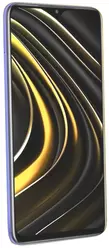


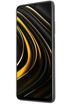
-
 6.53" IPS TFT
1080 x 2340 px
6.53" IPS TFT
1080 x 2340 px
Aspect ratio: 19.5:9 -
 162.30 x 77.30 x 9.60 mm
198.00 g
162.30 x 77.30 x 9.60 mm
198.00 g
-
 48 Mpx
Front: 8 Mpx
48 Mpx
Front: 8 Mpx
-
 Li-Po 6000 mAh
-
 4 GB
4 GB
-
 64 GB, 128 GB
-
 Qualcomm Snapdragon 662 SM6115
-
 4Q 2020
(5 years 9 months ago) -
 625.00 C2T
Battery capacity to thickness ratio
625.00 C2T
Battery capacity to thickness ratio
-
 83.40%
Screen-to-body ratio
83.40%
Screen-to-body ratio

| Brand |
POCO POCOSmartphones |
|---|---|
| Model name | M3 |
| Other names | M2010J19CG, M2010J19CT |
| Announced |
4Q 2020 (5 years 9 months ago) |
| Type | Touch |
| Waterproofness & dust-resistance | IP53 |
| Dimensions | 162.30 x 77.30 x 9.60 mm |
| Weight |
198.00 g
Buy case |
| Colour |
Available in 3 variants:
|
| Display |
Color / IPS TFT 16,7 millions colors, 60 Hz 1080 x 2340 px (6.53") 395 ppi ∼83.4% screen-to-body ratio |
| Display protection |
Corning Gorilla Glass 3
Buy screen protector |
| Talk time (max.) | 4G: 2400 min. (40.0 h) |
| Stand-by (max.) |

|
| Playback time (max.) |
Audio: 196 h Video: 17 h |
| Standard battery |
Li-Po 6000 mAh
Buy powerbank |
| Quick battery charging | Quick Charge |
| Charger included in the package |
|
| Wireless battery charging |

|
| Internal memory |
Available in 2 variants:
Buy memory card |
| RAM memory | 4 GB |
| Memory cards |
 microSD, microSDHC, microSDXC (up to 512 GB)
|
| Operating system | Android 10 |
| Interface | MIUI 12 |
| Processor |
Qualcomm Snapdragon 662 SM6115
Processor clock: 2.00 GHz Number of cores: 8 GPU: Adreno 610 |
| Standards |
GSM, UMTS, LTE, CDMA, TD-SCDMA
read more
|
| Touchscreen |
|
| DualSIM |
|
| SIM card(s) | nanoSIM, nanoSIM |
| DualSIM mode | dual standby |
| Hybrid DualSIM |
|
| EAN |
Available in 6 variants:
|
| MPN |
Available in 6 variants:
|

ADDITIONAL INFORMATION
-
18W charging, 22.5W charger. Reverse charging. LPDDR4X, UFS 2.1 (64 GB)/UFS 2.2 (128 GB).

PICTURES FROM THIS PHONE



CAMERAS - BACK
First camera
-
Camera typeStandard
-
Photo matrix48 Mpx
-
Sensor size1/2
-
Pixel size0,8 µm
-
Resolution8000x6000 px
-
Digital zoom
-
Flash LED
-
Video resolution1920x1080
-
Video formatsH.264, H.265, MPEG4 - 30 fps
-
AdditionalAF, f/1.79
Second camera
-
Camera typeDepth of field
-
Photo matrix2 Mpx
-
Pixel size1,75 µm
-
Digital zoom
-
Flash LED
-
AdditionalFF, f/2.4
Third camera
-
Camera typeMacro
-
Photo matrix2 Mpx
-
Pixel size1,75 µm
-
Digital zoom
-
Flash LED
-
AdditionalFF, f/2.4

CAMERAS - FRONT
First camera
-
Camera typePortrait
-
Photo matrix8 Mpx
-
Pixel size1,12 µm
-
Digital zoom
-
Flash
-
Video formatsH.264, H.265, MPEG4 - 30 fps
-
AdditionalFF, f/2.0

SENSORS
-
Accelerometer
-
Proximity
-
Light
-
Magnetometer
-
Gyroscope
-
Barometer
-
Altimeter
-
Gravity
-
Hall-effect
-
Iris scanner
-
Fingerprint scanner
-
Thermometer
-
Hygrometer

DATA TRANSFER
-
HSDPA42.20 Mbit/s
-
HSUPA5.76 Mbit/s
-
HSPA
-
HSPA+
-
LTE DL391.70 Mbit/s
-
LTE UP150.80 Mbit/s
-
GPRS
-
EDGE
-
Bluetooth
v5.0
Buy headphones
-
A2DP Profile
-
WiFi
v802.11 a/b/g/n/ac
read more
-
Miracast
-
DLNA
-
Infrared
-
USB
v2.0 OTG
Type-C Buy adapter -
GPS module
-
A-GPS
-
GLONASS support
-
Beidou
-
Galileo

COMMUNICATION AND MESSAGING
-
Call waiting
-
Conferency
-
Call forwarding
-
Push To Talk
-
Instant Messenger
-
SMS
-
SMS Memory
-
MMS
-
Dictionary
T9
-
e-mail client
-
e-mail protocolsPOP3, IMAP4, SMTP
-
RSS Reader

MULTIMEDIA
-
Radio
-
MP3
-
Stereo speakers2 speakers
-
Audio Jack3.5 mm Buy headphones
-
HD Voice
-
Sound formatsAAC, AAC+, AMR, APE, FLAC, MKA, OGG, WAV, eAAC+
-
Java
ART
-
Videophone

PIM AND ADDITIONAL FUNCTIONS
-
Watch
-
Stopwatch
-
Alarm
-
Calculator
-
Organizer
-
Calendar
-
Flight mode
-
Data and fax
-
Voice dial
-
Speakerphone
-
Recorder
-
Vibrations

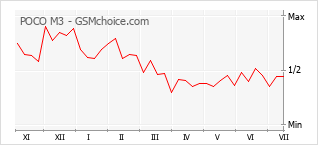
POPULARITY CHART


Your rating
5,59

General
Design
Features
Ratings:
89 |
Visits:
252892 |
Popularity:
0,02%
Opinions (17)
Questions (0)
Ratings:
89 |
Visits:
252892 |
Popularity:
0,02%
 To your site
 Compare data


A D V E R T I S E M E N T
We do our best to present the proper and current information on this page. However, in case of finding any error in the data above please

Sylkup
I used the phone for less than a year and a half. After the third phone update, the device stopped working. It is an absurdity with these ridiculous updates; it is very poor that people introduce such low-quality products to the market. At this moment, there is no possibility of repairing the phone. The situation with all these updates of theirs is ridiculous; who even invented this?!!... A failure ten times over. It is a disaster and I do not know what worse could be said on this subject.... Hopelessness!!!!!
POCO M3 _ użytkownik
There is a new update to MIUI 12.5.7 RJFEUXM (installation file 194 MB). After the update, the security status is set to August 1, 2022. Current Android version 11RKQ1.201004.002. WiFi works, but I do not know if it is better than before the update. POCO M3 released November 27, 2022. It is unknown if it will receive Android 12. We will probably find out within a few months.
POCO M3_użytkownik
Notes only for those users who have encountered DeadBoot, meaning the smartphone is turned on, but nothing responds to buttons or even the charger, there are no sounds, and nothing is displayed on the screen.
I have encountered DeadBoot again because the battery drained to 0%.
Therefore, after many experiences, I wanted to provide a summary here for those encountering this for the first time:
- lately, DeadBoots occur in a double manner, meaning after 3 days it unlocks for a fraction of a second and locks for another approximately 7 days. Unfortunately, waiting times for unlocking can be even several weeks longer.
- I placed a piece of a flat stick, like the ones provided at McDonald's for stirring sugar in coffee, on the power button (after slightly lifting the side of the silicone case). It protrudes slightly (a bulge) on the side, but it is effective. A small piece of thin plastic in the shape of an angle bracket might be better, but I will not change it now.
I unlock and lock the screen with a double tap on the screen. This can be configured in the settings.
When someone encounters a DeadBoot, you have to wait until the battery depletes below the minimum value, and then the motherboard unlocks (at this time, the stick must be removed).
It is impossible to check how much battery is left. Disassembling the smartphone and disconnecting the battery from the motherboard will not help, as I have already done that. I took it apart and disconnected the battery from the motherboard for two hours and reconnected it, with no result.
Various methods involving heating the processor or memory are provided on YouTube, but users reported that the situation returns.
DeadBoot occurs in three situations:
- after discharging to 0%
- after a long press of the power button
- after turning off the smartphone or attempting a restart
The last security update was in December 2022, and you can still perform updates in the Play Store and use the smartphone normally.
The problem is the Google Play system update, which I have current as of July 1, 2023, but a new update has arrived and, to install it, a "restart" is required, which as I mentioned before risks another ordeal with DeadBoot and about 10 days of waiting for the "resurrection."
Perhaps I will perform this restart when the battery indicator is at 2%, so as not to wait long for the unlock during a DeadBoot.
The smartphone still has a functional battery and I use it mainly for listening to the radio and various experiments, as I do not have personal data on it. WiFi has a shorter range than standard, but otherwise works normally.
POCO M3_użytkownik
I did not expect any MIUI or Android updates, but... Supposedly MIUI 14 is already available for POCO M3 with the April security patch. I check from time to time and have not received any update. I will not attempt complex procedures with Recovery and will wait for the official arrival via OTA, which is for regular users. On the other hand, updates for individual components arrive periodically, for example, Xiaomi FM Radio (currently version 1.0.499). I only recently started this radio and it turned out that it requests permissions for the microphone, multimedia, and phone. Without these three permissions, the radio will not function and we will not be able to use the FM module in the smartphone. Permissions only work when the application is running. The radio offers recording of what is currently playing, and here access permission to the "File Manager" application is required, and then, to be able to listen, another access to the Voice Recorder application is required, and the Voice Recorder application requests access to Multimedia. It turns out that the Radio application uses the Voice Recorder application to record and play back recorded files. Upon subsequent launches of the radio, recording, and playback, there is no longer a message requesting permission, so there are no further interruptions. The radio also offers an automatic sleep timer with settings for 15, 30, 45, or 60 minutes. After this time, the radio turns off, but the smartphone remains active. Without headphones connected to the jack, the radio will not function because the cable also serves as an antenna. If we do not have headphones, you can place a finger on the jack and turn on the radio, then the smartphone speaker mode will activate. The quality will be lower and it is better to tune into a strong station, although even then there may be interruptions. During the first launch of the radio, a scan of all frequencies occurs and a preliminary list of active frequencies is set up, but without names. Later, names can be added to favorite frequencies. The radio does not have RDS. There is an option to switch to the smartphone speakers, but then the sound in the headphones is muted. It is not possible to listen through headphones and speakers simultaneously.
Rozczarowana
I purchased 3 pieces of this phone. For myself and for my parents. My friend also bought it. Attractive parameters and the price tempted us. Unfortunately, all the phones suffered malfunctions. In my friend's case, it turned off and did not turn on again - the motherboard required replacement. In my father's case, it turned off and only turned on after several days, only to turn off again and refuse to turn on - the motherboard was also to blame. In my case, the phone began to function erratically - I could not turn on the flashlight, turn on the camera, or access notes, and applications were freezing and closing. The message "Chrome keeps stopping" appeared repeatedly, and Google Assistant would activate itself continuously. Even videos in the gallery would not start and the internet connection was dropping. The alarm only vibrated; there was no sound. People who called me heard a normal signal, but my phone did not react at all; no incoming call appeared, no sound, nothing. Then it turned off. It would not turn on for 15 minutes. When it finally turned on, I immediately transferred my data to an old phone. For now, it is stable, but I am afraid to use this phone, fearing it might fail again soon. I am now looking for another one. My mother's phone is still functioning for the most part, except for minor freezing and the microphone turning off automatically during calls. All these anomalies appeared after approximately one year of use. I do not recommend this phone.
POCO M3_użytkownik
It happened again. I pressed the power button for a longer time, and a menu with options should have appeared: power off, restart, screenshot. Instead of the menu, it immediately shut down and entered an unresponsive state after an attempted start. I opened the casing, unscrewed 10 screws, and removed the cover. I repeatedly disconnected and reconnected the battery from the motherboard with the charger connected and without it, but the phone showed no signs of operation. I reassembled it. After 3 days, I pressed it and an empty battery icon flashed for a moment, but nothing more could be done; even connecting the charger for a few moments did not help. Only after several more days did the phone become functional again, and every time I pressed the power button, it showed an empty battery. I connected the charger, and after 10 minutes, the charging screen appeared, and I was able to turn on the phone normally using the button. There are videos online suggesting that heating the shield on the integrated circuit fixes the phone, but users report that the situation recurs. So now I have to be careful not to press the power button for a long time. Anyway, you can wake and sleep the screen with a double tap. This can be configured in the menu.
POCO M3_użytkownik
After switching it on and off several times, a dead boot occurred again. This time I waited about 7 days for the battery to drain. I charged it to 1% and immediately a dead boot occurred. The next day the battery ran out and I charged it to 2% and it turned on normally. I decided to stop turning off the smartphone to avoid the dead boot known as Dedboot. This model has problems with this all over the world and people try to solve it in various ways. The solutions are not permanent. I noticed that after my first dead boot and restoration to normal operation, the smartphone showed a strange icon in the center of the screen at the start of subsequent boots - three blocks: one oblong, and two smaller square ones above it. It personally seems to me that some update could have had a negative impact and damaged something, but not necessarily the system. The only risk will be during a large update that requires a smartphone restart. So I ordered tools for disassembly and I will see how it works with a charged battery, whether it is enough to just disconnect the battery from the motherboard for a minute and reconnect it.
POCO M3_użytkownik
My unit failed today. I read that it suddenly stopped turning on for others and thought I was lucky because everything was fine for me. It worked reliably for 2 years, 7 months, and about 18 days. Today it did not turn on; I pressed the power button for over a minute. It does not respond to the charger. Apparently, this is a dead boot, meaning it is powered on to a certain point but does not proceed further. I will do as others have and wait for the battery to discharge, which may take a month or two. Discharging the battery is probably equivalent to a soft reset. Then it might start, and if not, I will recycle it. If it starts, I will be careful not to turn it off anymore, meaning I will enable maximum battery saving and disable unnecessary background functions. Fortunately, it has not been my primary phone for a year, and I have nothing important in the memory. I used it mainly for FM radio and internet radio because the screen is not good enough for movies. I occasionally used websites.
POCO M3_użytkownik
DeadBoot has disappeared. It is a strange occurrence because I have recently been experimenting frequently and performing Factory Resets to clear the system of remnants from risky applications. Before the reset, I would discharge it to 1% or 2% to avoid waiting too long for the battery to be depleted. Suddenly, during the most recent reset and restart, an empty battery icon appeared, and as is known, after a DeadBoot, there is no icon even when the charger is connected.
In total, I have experienced the smartphone entering DeadBoot mode approximately 10-12 times in a row. The smartphone is already old, but all functions still work, and the screen is sufficiently bright in indoor conditions. I will also add that I recently mounted the smartphone on a tripod with very tightly clamped jaws, and perhaps that influenced it? It is difficult to say. The important thing is that it works, but I would not risk using this device as a primary smartphone for communication.
POCO M3 _ użytkownik
@Rozczarowana. Your opinion is not isolated, because a very large number of POCO M3 units turned off and would not turn back on. My unit operates stably. I previously had a Mi A2 Lite and that one was a record holder in terms of rendering smartphones unusable after a faulty update released by Xiaomi. My rule is that after purchasing a Xiaomi smartphone, I do not set up a Google account or any other personal settings and I do not install any applications. First, I perform the pending updates (sometimes there are several consecutive pending updates), and finally, I perform a "Factory reset". This allows me to avoid most of the consequences resulting from software errors. Only then can you set up the main Google account, install applications, and configure personal settings.